
- Introduction
- Redis Cluster Architecture
- Building a 6-Node Redis Cluster
- Cluster Configuration Parameters and Defaults
- Cluster Operations
- MOVED vs ASK — Two Different Meanings of a Redirect
- Resharding, Start to Finish
- Automatic Failover
- The Failover Timeline — What Actually Happens
- The Consistency Boundary — Writes Redis Cluster Can Lose
- Monitoring
- Troubleshooting
- Failure Cases and Traps
- When Not to Use Redis Cluster
- References
- Conclusion
- Quiz
Introduction
A single Redis instance has limits in terms of memory and throughput. Redis Cluster is a native clustering solution that automatically distributes (shards) data across multiple nodes and provides automatic failover when nodes go down.
In this article, we will understand the Redis Cluster architecture and walk through the setup and operations step by step.
Which Version This Article Targets
Every command and default value in this article is written against the Redis 7.4 open source distribution — the same version the docker compose example below pins with the redis:7.4 image.
Cluster command names and configuration defaults change between major versions. For example, CLUSTER SLOTS, which reads the slot map, is already marked deprecated in the official specification, and new clients are directed to CLUSTER SHARDS instead. If you run a different major version, re-check command names and defaults against that version's documentation. Every default this article states as a number is collected, with its source, in the "Cluster Configuration Parameters and Defaults" section below.
Redis Cluster Architecture
Hash Slots
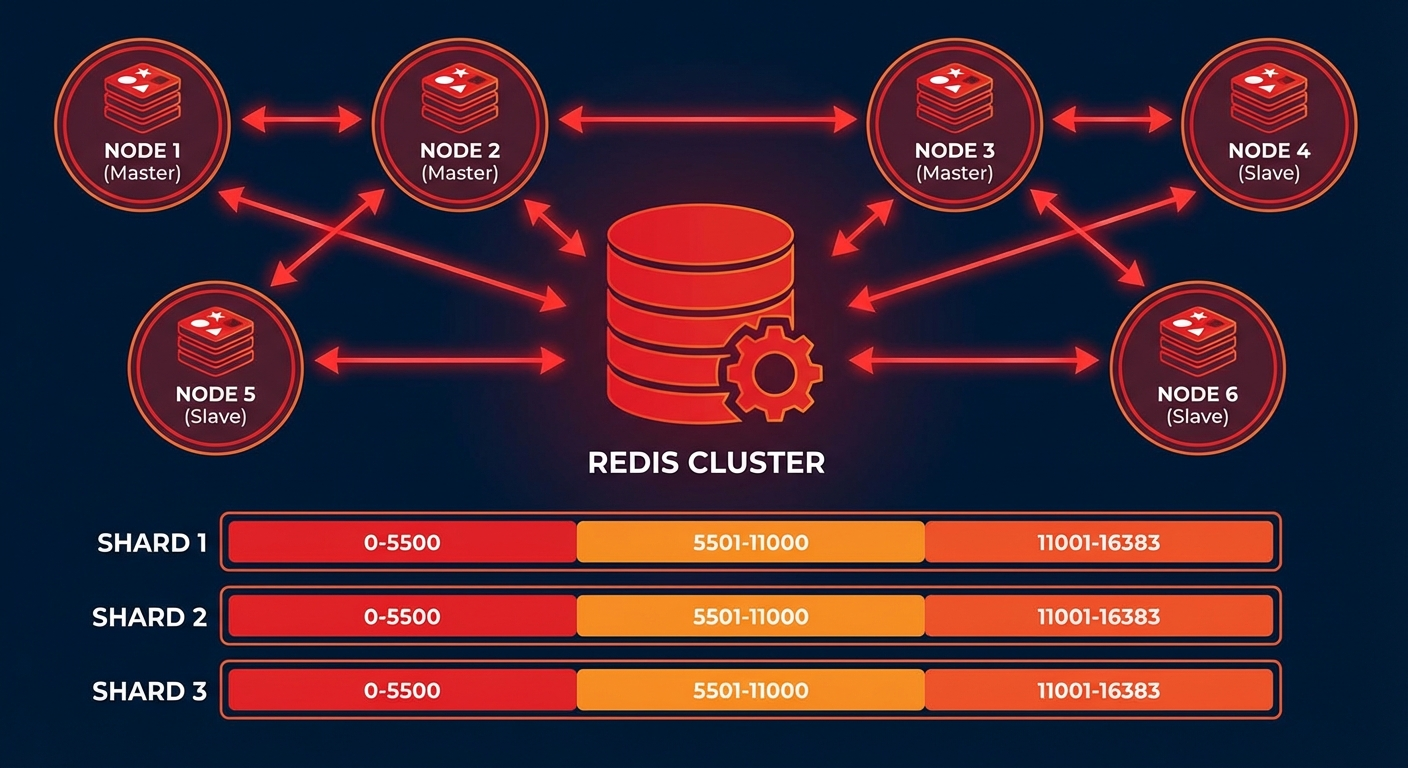
Redis Cluster uses 16,384 hash slots to distribute data:
# Calculating the hash slot for a key
# HASH_SLOT = CRC16(key) % 16384

# Example: 3 master nodes
# Node A: Slots 0 ~ 5460
# Node B: Slots 5461 ~ 10922
# Node C: Slots 10923 ~ 16383
Cluster Topology
# Minimum recommended configuration: 3 Masters + 3 Replicas = 6 nodes
#
# Master A (Slots 0-5460)     ←→  Replica A'
# Master B (Slots 5461-10922)  ←→  Replica B'
# Master C (Slots 10923-16383) ←→  Replica C'
#
# When a Master goes down, its Replica is automatically promoted
Building a 6-Node Redis Cluster
Setup with Docker Compose
# docker-compose.yml
version: '3.8'

services:
  redis-node-1:
    image: redis:7.4
    container_name: redis-node-1
    ports:
      - '7001:7001'
      - '17001:17001'
    volumes:
      - ./redis-node-1:/data
    command: >
      redis-server
      --port 7001
      --cluster-enabled yes
      --cluster-config-file nodes.conf
      --cluster-node-timeout 5000
      --appendonly yes
      --protected-mode no
      --bind 0.0.0.0
    networks:
      redis-cluster:
        ipv4_address: 172.20.0.11

  redis-node-2:
    image: redis:7.4
    container_name: redis-node-2
    ports:
      - '7002:7002'
      - '17002:17002'
    volumes:
      - ./redis-node-2:/data
    command: >
      redis-server
      --port 7002
      --cluster-enabled yes
      --cluster-config-file nodes.conf
      --cluster-node-timeout 5000
      --appendonly yes
      --protected-mode no
      --bind 0.0.0.0
    networks:
      redis-cluster:
        ipv4_address: 172.20.0.12

  redis-node-3:
    image: redis:7.4
    container_name: redis-node-3
    ports:
      - '7003:7003'
      - '17003:17003'
    volumes:
      - ./redis-node-3:/data
    command: >
      redis-server
      --port 7003
      --cluster-enabled yes
      --cluster-config-file nodes.conf
      --cluster-node-timeout 5000
      --appendonly yes
      --protected-mode no
      --bind 0.0.0.0
    networks:
      redis-cluster:
        ipv4_address: 172.20.0.13

  redis-node-4:
    image: redis:7.4
    container_name: redis-node-4
    ports:
      - '7004:7004'
      - '17004:17004'
    volumes:
      - ./redis-node-4:/data
    command: >
      redis-server
      --port 7004
      --cluster-enabled yes
      --cluster-config-file nodes.conf
      --cluster-node-timeout 5000
      --appendonly yes
      --protected-mode no
      --bind 0.0.0.0
    networks:
      redis-cluster:
        ipv4_address: 172.20.0.14

  redis-node-5:
    image: redis:7.4
    container_name: redis-node-5
    ports:
      - '7005:7005'
      - '17005:17005'
    volumes:
      - ./redis-node-5:/data
    command: >
      redis-server
      --port 7005
      --cluster-enabled yes
      --cluster-config-file nodes.conf
      --cluster-node-timeout 5000
      --appendonly yes
      --protected-mode no
      --bind 0.0.0.0
    networks:
      redis-cluster:
        ipv4_address: 172.20.0.15

  redis-node-6:
    image: redis:7.4
    container_name: redis-node-6
    ports:
      - '7006:7006'
      - '17006:17006'
    volumes:
      - ./redis-node-6:/data
    command: >
      redis-server
      --port 7006
      --cluster-enabled yes
      --cluster-config-file nodes.conf
      --cluster-node-timeout 5000
      --appendonly yes
      --protected-mode no
      --bind 0.0.0.0
    networks:
      redis-cluster:
        ipv4_address: 172.20.0.16

networks:
  redis-cluster:
    driver: bridge
    ipam:
      config:
        - subnet: 172.20.0.0/24
# Start containers
docker compose up -d

# Create cluster (3 masters + 3 replicas)
docker exec -it redis-node-1 redis-cli --cluster create \
  172.20.0.11:7001 172.20.0.12:7002 172.20.0.13:7003 \
  172.20.0.14:7004 172.20.0.15:7005 172.20.0.16:7006 \
  --cluster-replicas 1 --cluster-yes

# Check cluster status
docker exec -it redis-node-1 redis-cli -p 7001 cluster info
docker exec -it redis-node-1 redis-cli -p 7001 cluster nodes
Setup on Bare Metal / VM
# Install Redis (Ubuntu)
sudo apt update && sudo apt install -y redis-server

# Create configuration file for each node
cat > /etc/redis/redis-7001.conf << 'EOF'
port 7001
cluster-enabled yes
cluster-config-file nodes-7001.conf
cluster-node-timeout 5000
appendonly yes
appendfilename "appendonly-7001.aof"
dbfilename dump-7001.rdb
dir /var/lib/redis/7001
logfile /var/log/redis/redis-7001.log
pidfile /var/run/redis/redis-7001.pid
protected-mode no
bind 0.0.0.0

# Memory settings
maxmemory 4gb
maxmemory-policy allkeys-lru

# Performance tuning
tcp-backlog 511
timeout 0
tcp-keepalive 300
EOF

# Create directory
sudo mkdir -p /var/lib/redis/7001
sudo chown redis:redis /var/lib/redis/7001

# Start service
sudo redis-server /etc/redis/redis-7001.conf --daemonize yes

# After starting all 6 nodes, create the cluster
redis-cli --cluster create \
  192.168.1.1:7001 192.168.1.2:7002 192.168.1.3:7003 \
  192.168.1.4:7004 192.168.1.5:7005 192.168.1.6:7006 \
  --cluster-replicas 1
Cluster Configuration Parameters and Defaults
There are only a handful of settings that actually govern cluster behavior. The compose file above sets cluster-node-timeout 5000 explicitly — that is not the distribution default, it is a value deliberately lowered for the example. The defaults below are the ones written in the comments of Redis 7.4's redis.conf, and every one of them ships commented out. In other words, if you do not write them in your config file, these are the values in effect.
- cluster-node-timeout — default 15000 (ms). If a node is unreachable for longer than this, it is considered to be in a failure state. As the documentation puts it, "most other internal time limits are a multiple of the node timeout", so this single value determines the speed of the entire failover.
- cluster-replica-validity-factor — default 10. A factor that makes a replica give up on failover when its data looks too old. If the time elapsed since its last interaction with the master exceeds the node timeout multiplied by this factor plus
repl-ping-replica-period, that replica will not even attempt promotion. The example given in the docs: with a node timeout of 30 seconds, a factor of 10, and the default ping period of 10 seconds, the threshold is 310 seconds. Set to 0 and the replica will always try to failover no matter how old its data is. - cluster-migration-barrier — default 1. The minimum number of working replicas that must remain on the original master before another replica may migrate to an orphaned master (one left with no replicas at all). A value of 1 means "migrate only if at least one other working replica remains".
- cluster-allow-replica-migration — default yes. Turns that automatic migration on and off entirely. Set to no and both migration to orphaned masters and migration away from masters that became empty are disabled.
- cluster-require-full-coverage — default yes. If even one hash slot has no node serving it, the whole cluster stops accepting queries. Set to no and it keeps serving queries for the part of the key space that is still covered. The
CLUSTERDOWNdiagnosis further down is ultimately a story about this setting. - cluster-replica-no-failover — default no. Set to yes and replicas will not attempt automatic failover. A manual failover is still possible. This is the switch for multi-datacenter setups where one side must never be promoted.
- cluster-allow-reads-when-down — default no. Set to yes and a node will keep serving reads for the slots it believes it owns even while the cluster is in a down state. This exists for uses like a cache, where giving up consistency during an outage is acceptable.
If you need to tune something that is not listed here, do not guess — read the redis.conf comments of the version you are running. That file ships with every distribution and states the default of each option right in the comment.
Cluster Operations
Reading and Writing Data
# Connect in cluster mode (-c flag)
redis-cli -c -h 172.20.0.11 -p 7001

# MOVED redirections are handled automatically
172.20.0.11:7001> SET user:1000 "Kim Youngju"
-> Redirected to slot [3817] located at 172.20.0.11:7001
OK

172.20.0.11:7001> SET user:2000 "Park Minho"
-> Redirected to slot [8234] located at 172.20.0.12:7002
OK
Storing in the Same Slot with Hash Tags
# Only the {user:1000} part is used for hash calculation
SET {user:1000}.profile "Kim Youngju"
SET {user:1000}.email "youngju@example.com"
SET {user:1000}.settings "{\"theme\":\"dark\"}"

# Stored in the same slot, so MGET is possible
MGET {user:1000}.profile {user:1000}.email
Python Client
from redis.cluster import RedisCluster

# Connect to cluster
rc = RedisCluster(
    startup_nodes=[
        {"host": "172.20.0.11", "port": 7001},
        {"host": "172.20.0.12", "port": 7002},
        {"host": "172.20.0.13", "port": 7003},
    ],
    decode_responses=True,
    skip_full_coverage_check=True
)

# Basic operations
rc.set("user:1000", "Kim Youngju")
print(rc.get("user:1000"))

# Pipeline (only for keys in the same slot)
pipe = rc.pipeline()
pipe.set("{user:1000}.name", "Kim Youngju")
pipe.set("{user:1000}.age", "30")
pipe.get("{user:1000}.name")
results = pipe.execute()
print(results)

# Cluster info
print(rc.cluster_info())
Adding / Removing Nodes
# Add a new master node
redis-cli --cluster add-node 172.20.0.17:7007 172.20.0.11:7001

# Rebalance slots
redis-cli --cluster rebalance 172.20.0.11:7001

# Add a replica to the new node
redis-cli --cluster add-node 172.20.0.18:7008 172.20.0.11:7001 \
  --cluster-slave --cluster-master-id <master-node-id>

# Remove a node (first move slots to another node)
redis-cli --cluster reshard 172.20.0.11:7001 \
  --cluster-from <removing-node-id> \
  --cluster-to <target-node-id> \
  --cluster-slots 5461 \
  --cluster-yes

redis-cli --cluster del-node 172.20.0.11:7001 <removing-node-id>
MOVED vs ASK — Two Different Meanings of a Redirect
This is the single most misunderstood part of Redis Cluster. Both replies say "go to another node", but what the client is supposed to do next is the exact opposite in each case.
MOVED — the slot has permanently changed owner
When a node receives a key whose hash slot it does not serve, it consults its internal slot-to-node map and replies with a MOVED error. The example from the specification looks like this.
GET x
-MOVED 3999 127.0.0.1:6381
The error carries the hash slot of the key (3999) and the endpoint and port of the instance that can serve the query. The endpoint may be an IP address, a hostname, or empty. An empty endpoint means "send the next request to the same endpoint as the current one, but with the given port".
A client that receives MOVED should update its slot map. The specification recommends refetching the whole map with CLUSTER SHARDS rather than patching just the one slot: a redirection usually means several slots were reconfigured at once, not one. When a replica is promoted to master, every slot that master used to serve is remapped in a single step.
ASK — this key only, this request only
ASK appears while a slot is being migrated. When a slot is marked MIGRATING on the source node, that node accepts queries for the slot but only when the key actually exists. If it does not, it sends an ASK redirection to the migration target. The target node has the slot in IMPORTING state, so any query not preceded by an ASKING command is bounced back to the real owner with MOVED.
The specification states the client-side ASK rules in three lines.
- Send only the redirected query to the specified node, and keep sending subsequent queries to the old node.
- Start the redirected query with the
ASKINGcommand. - Do not yet update the local slot map.
ASKING sets a one-time flag on the client that forces a node to serve a query about an IMPORTING slot. Exactly once.
What happens if a client treats ASK like MOVED
Its slot map ends up disagreeing with reality. Migration is not finished, yet the client has recorded the slot as owned by the target node. Sending the next request straight to the target without ASKING in front means the target replies with MOVED, pointing back at the original owner.
Nothing gets corrupted. As the specification makes explicit, the ASKING requirement is precisely that safety net. But you pay for it. Every request for that slot takes an extra round trip, and the client map keeps flapping between the two nodes until migration ends. If you are moving a slot that carries heavy traffic, that extra round trip shows up directly in your latency graphs. Once migration completes the source node sends MOVED, and only then should the map be updated permanently.
redis-cli -c handles both cases for you. Unless you are writing a client from scratch you can trust the library — but it is worth confirming that your library actually distinguishes the two replies. The specification is blunt about this: a client that cannot handle ASK redirections "is not a complete Redis Cluster client".
Resharding, Start to Finish
Moving slots is the one operation everything else is built from. Adding a node, removing a node, and rebalancing are all abstracted into the same thing — in the specification's words, "moving a hash slot from one node to another".
Step 1 — capture the state before you touch anything
redis-cli --cluster check 127.0.0.1:7000

# This is where you find node IDs
redis-cli -p 7000 cluster nodes | grep myself
# Example output (shape taken from the specification)
97a3a64667477371c4479320d683e4c8db5858b1 :0 myself,master - 0 0 0 connected 0-5460

[OK] All 16384 slots covered
[OK] All 16384 slots covered means there is at least one master serving each of the 16384 slots. If that line does not appear, do not start resharding. Moving slots inside an already broken cluster makes the causes impossible to separate afterwards.
Step 2 — run the reshard
redis-cli --cluster reshard 127.0.0.1:7000
You only specify one node; redis-cli finds the rest by itself. It then asks three things interactively.
How many slots do you want to move (from 1 to 16384)?
Next it asks for the node ID of the target that will receive the slots, and finally which nodes to take them from. Answering all takes a share of slots from every other master. After the final confirmation you get one message per slot being moved, and a dot printed for every individual key that actually moves.
To automate it, use the non-interactive form.
redis-cli --cluster reshard <host>:<port> \
  --cluster-from <node-id> \
  --cluster-to <node-id> \
  --cluster-slots <number of slots> \
  --cluster-yes
--cluster-yes answers yes to the prompts automatically. It can also be enabled by setting the REDISCLI_CLUSTER_YES environment variable.
Step 3 — what actually happens underneath
To move slot 8 from A to B, redis-cli works through this sequence.
# Tell B: you are importing this slot from A
CLUSTER SETSLOT 8 IMPORTING A

# Tell A: you are migrating this slot to B
CLUSTER SETSLOT 8 MIGRATING B

# Pull keys out of slot 8 on A, count at a time
CLUSTER GETKEYSINSLOT slot count

# Move them atomically
MIGRATE target_host target_port "" target_database id timeout KEYS key1 key2 ...

# When done, set both sides (and usually every other node) back to the normal state
CLUSTER SETSLOT <slot> NODE <node-id>
MIGRATE connects to the target instance, sends a serialized version of the key, and deletes its own copy once it receives an OK. Both instances are locked for the very short time the move takes, so there are no race conditions. From an external client's point of view the key exists either in A or in B — exactly one place — at any given moment.
That is why reads and writes keep working. The other nodes still point clients at A for slot 8; keys that are still on A are served by A; keys that are not on A are handed to B with an ASK. So no new keys accumulate on A, and requests never stop.
Multi-key commands are the exception. Even during migration, a multi-key operation works as long as every target key exists and every one of them hashes to the same slot on one side (source or destination). But if some keys do not exist, or if they are split between source and destination, you get a -TRYAGAIN error. The client should retry after a short delay or surface the error. Once migration for that slot finishes, multi-key operations on it work normally again.
Step 4 — verify afterwards
redis-cli --cluster check 127.0.0.1:7000
All slots must still be covered, and only the target node's slot count should have grown. In the documentation's example, after moving 1000 slots, 127.0.0.1:7000 ends up serving something around 6461. Skip this check and a migration that was interrupted halfway leaves slots stuck in MIGRATING/IMPORTING, which comes back later as CLUSTERDOWN.
Automatic Failover
Failover Process
# 1. Master A failure detected (after cluster-node-timeout seconds)
# 2. Replica A' requests votes from other Masters
# 3. If a majority of Masters approve, Replica A' is promoted to Master
# 4. New Master A' takes over the original slots

# Failover test
docker stop redis-node-1

# Check status (Replica promoted to Master)
docker exec -it redis-node-2 redis-cli -p 7002 cluster nodes
Manual Failover
# Execute on Replica (graceful failover)
redis-cli -h 172.20.0.14 -p 7004 CLUSTER FAILOVER

# Force failover (when Master is down)
redis-cli -h 172.20.0.14 -p 7004 CLUSTER FAILOVER FORCE
The Failover Timeline — What Actually Happens
The four-step summary above is correct but far too coarse. To calculate your outage window you need to know what each stage is waiting on. What follows is the failure detection and replica election procedure from the cluster specification, in order. For readability, "node timeout" below means the cluster-node-timeout value.
1. The master stops responding. The other nodes now have an outstanding ping with no reply. Once half the node timeout has elapsed, nodes try to reconnect to the peer — a mechanism specifically there to keep broken TCP connections from turning into false failure reports.
2. PFAIL is set. If there is still no reply after the node timeout, the node is flagged PFAIL (possible failure). Both masters and replicas can flag another node, regardless of its type. The important part is that PFAIL is purely local knowledge held by one node. On its own it triggers nothing.
3. Gossip escalates PFAIL to FAIL. Every node includes the state of a few known nodes in its heartbeats. If node A has B flagged PFAIL, and A has collected — via gossip — reports that a majority of masters also see B as PFAIL or FAIL, the escalation condition is met. Only reports received within the node timeout multiplied by a validity factor count, and in the current implementation that factor is 2, so the window is twice the node timeout. When the condition holds, A marks B as FAIL and sends a FAIL message directly to every reachable node.
4. The replica waits before running. Even after its master is FAIL, a replica does not start an election immediately. The delay formula in the specification is this.
DELAY = 500 milliseconds + random delay between 0 and 500 milliseconds +
        REPLICA_RANK * 1000 milliseconds.
The fixed 500ms buys time for the FAIL state to propagate across the cluster, because a master that does not yet know about FAIL will refuse to grant its vote. The random delay desynchronizes replicas so they do not all start an election at once. REPLICA_RANK is 0 for the replica with the most advanced replication offset, 1 for the next, and so on, so the freshest replica goes first. Rank is not strictly enforced: if a higher-ranked replica fails to get elected, the others try shortly after.
5. Requesting votes. The replica increments its own currentEpoch and broadcasts a FAILOVER_AUTH_REQUEST to every master. It waits for replies for up to twice the node timeout, but always for at least 2 seconds.
6. Majority approval. Masters reply with FAILOVER_AUTH_ACK, and the replica wins once a majority has answered. A master votes only once per epoch, and will not vote again for another replica of the same master for twice the node timeout. If the majority is not reached, the election is aborted and retried after four times the node timeout (at least 4 seconds).
7. Promotion and propagation. The winning replica obtains a new configEpoch higher than that of any existing master, advertises itself as master, and carries the set of slots it serves along with it. To speed up reconfiguration it broadcasts a pong packet to the whole cluster. Other nodes see a new master claiming the same slots with a greater configEpoch and upgrade their configuration.
What the client sees at each stage
- Stages 1–3: requests for that slot fail with timeouts or connection errors. No MOVED arrives — the slot has not changed owner, it is simply dead.
- While the cluster is judged to be in fail state: because
cluster-require-full-coveragedefaults to yes, an uncovered slot makes the cluster refuse queries. - After stage 7: a client still using the old master's address is pointed at the new master with MOVED. From the moment it refetches the slot map, it is back to normal.
So how long is the window
The documentation says the majority side becomes available again after the node timeout plus the few extra seconds a replica needs to be elected and complete the failover, and adds that failovers usually finish in a matter of 1 or 2 seconds. The practical floor is therefore cluster-node-timeout plus a few seconds. With the default of 15000ms that is 15 seconds or more, which is exactly why the compose example lowers it to 5000ms.
That does not mean you can lower it without limit. The specification is explicit that the node timeout must be large compared to the network round trip time for the mechanism to work. Set it too small and an ordinary latency blip reads as PFAIL, so failovers happen with no actual failure. A failover is not free — it comes with the write-loss window described below — so an unnecessary failover is an incident in itself.
The Consistency Boundary — Writes Redis Cluster Can Lose
Without this section, this article would not be honest. Redis Cluster replicates between nodes asynchronously, and its conflict resolution rule is, in the specification's words, "last failover wins" — the dataset of the last elected master eventually replaces all the others. That leaves two windows in which an acknowledged write can disappear.
Window 1 — the asynchronous replication window
A master replies OK to the client and propagates the write to its replicas at roughly the same time. If the master dies before propagating, and stays unreachable long enough that a replica is promoted, that write is lost forever. The specification notes this is hard to observe but is "a real world failure mode".
You cannot configure this window away. It is the definition of asynchronous replication.
Window 2 — the partitioned master window
A master is cut off from the majority by a network partition, but clients are still attached to it. When a replica is promoted on the majority side, every write the minority master accepted in the meantime is discarded.
Fortunately this window has an upper bound. For a master to be failed over it must be unreachable by the majority of masters for at least the node timeout, so if the partition heals before then, no writes are lost. And a master on the minority side starts refusing writes on its own once the node timeout has elapsed without contact with the majority. That bounds the maximum window of losable writes at the node timeout. After that the minority is simply unavailable, so it neither accepts nor loses anything more.
There is one more case in theory: a failed-over master returns from the partition and a client with a stale routing table writes to it. The specification considers this unlikely, because a master that could not talk to the majority for long enough is already refusing writes, and keeps refusing for a short while after the partition heals so configuration changes can propagate.
Availability is a probability too
In a cluster of N masters each with a single replica, the majority side stays available as long as only one node is partitioned away. With two nodes away, the probability that it stays available is 1-(1/(N*2-1)). For a five-master cluster, that means roughly an 11.11% chance the cluster becomes unavailable once two nodes are partitioned off. Adding nodes does not drive that probability to zero.
How far does WAIT get you
WAIT numreplicas timeout blocks until every preceding write sent on the current connection has been transferred to and acknowledged by at least numreplicas replicas. If the timeout (in milliseconds) is reached it returns anyway. The return value is the number of replicas that actually acknowledged — in both the success and the timeout case — so the client itself must check that the value is at least what it demanded. Inside MULTI, or in any context that does not allow blocking such as scripts, it does not block and returns the current count immediately. A timeout of 0 blocks forever.
What it does not guarantee matters more. The documentation states plainly that WAIT does not make Redis a strongly consistent store. If a write reached one or more replicas it becomes more likely, but not guaranteed, that a replica holding that write is the one promoted during a failover. Both Sentinel and Redis Cluster make only a best-effort attempt to pick the best replica, and in the documentation's own words it is still possible to lose a write that was synchronously replicated to multiple replicas.
In short, WAIT narrows the window; it does not close it. If you have data you cannot afford to lose, Redis should not be that data's system of record.
Monitoring
Key Metrics
# Check cluster status
redis-cli -p 7001 cluster info
# cluster_state:ok
# cluster_slots_assigned:16384
# cluster_slots_ok:16384
# cluster_known_nodes:6

# Memory usage per node
redis-cli -p 7001 info memory
# used_memory_human:1.5G
# maxmemory_human:4.0G

# Check slot distribution
redis-cli --cluster check 172.20.0.11:7001
Monitoring with Prometheus + Grafana
# docker-compose.monitoring.yml
services:
  redis-exporter:
    image: oliver006/redis_exporter:latest
    environment:
      - REDIS_ADDR=redis://172.20.0.11:7001
      - REDIS_CLUSTER=true
    ports:
      - '9121:9121'
# prometheus.yml
scrape_configs:
  - job_name: 'redis-cluster'
    static_configs:
      - targets: ['redis-exporter:9121']
# Key Grafana dashboard queries
# Commands per second
rate(redis_commands_processed_total[5m])

# Memory usage percentage
redis_memory_used_bytes / redis_memory_max_bytes * 100

# Number of keys
redis_db_keys

# Connected clients
redis_connected_clients

# Replication lag
redis_replication_offset
Troubleshooting
CROSSSLOT Error
# Error: CROSSSLOT Keys in request don't hash to the same slot
# Cause: Using keys from different slots in MGET, MSET, etc.

# Solution: Use Hash Tags
MGET {order:1}.items {order:1}.total  # OK (same slot)
MGET order:1 order:2                  # ERROR (potentially different slots)
Cluster State Recovery
# When cluster state is fail
redis-cli --cluster fix 172.20.0.11:7001

# When slots are missing
redis-cli --cluster fix 172.20.0.11:7001 --cluster-fix-with-unreachable-masters
Failure Cases and Traps
Symptom first, then the diagnosis order. When you get paged at 3am, what you need is an order of operations, not a concept explanation.
1. CLUSTERDOWN Hash slot not served
Symptom: commands on certain keys fail with CLUSTERDOWN Hash slot not served. It can look like some keys work and others do not, or everything can fail at once.
Diagnosis order:
- Look at
redis-cli -p 7001 cluster info.cluster_state:failmeans the cluster is refusing queries on purpose. Ifcluster_slots_assignedis below 16384, some slots have no owner. - Run
redis-cli --cluster checkto find which slots are empty. If[OK] All 16384 slots covereddoes not appear, the cause shows up right here. - Split the cause in two: either a master died and no replica was promoted, or a resharding was interrupted and slots are stuck in MIGRATING/IMPORTING. If
cluster nodesoutput still shows migration markers next to slots, it is the latter. - For the latter, clean up with
redis-cli --cluster fix. For the former, ask why promotion did not happen: the remaining masters may not be a majority, the replica may have given up because of thecluster-replica-validity-factorcondition, orcluster-replica-no-failovermay be turned on.
A caution: the root cause of this error is that cluster-require-full-coverage defaults to yes. If you run a cache and partial availability is preferable, you can set it to no — but that is a decision to abandon the missing slots and serve the rest, not a way to get the data back. Erasing the symptom with a setting while leaving the cause in place is a common mistake here.
2. CROSSSLOT errors pour in after a client library upgrade
Symptom: the code has not changed, but after upgrading the library you start seeing CROSSSLOT Keys in request don't hash to the same slot. Usually the old library was quietly splitting multi-key commands for you, and the new version passes them to the server as the specification requires, exposing the problem.
Diagnosis order: first classify the failing command — is it a multi-key command (MGET, MSET, SUNION and friends), a Lua script touching several keys, or a MULTI transaction? All three are under the same constraint.
The design consequence is the real point. The specification says that using hash tags makes multi-key operations possible, which read the other way means they are impossible without them. Multi-key commands, Lua scripts, and transactions are all confined to a single slot. That makes a hash tag not a workaround you reach for when an error appears, but a schema decision about which keys must live in the same slot. It belongs in your key naming design, and changing it later means rewriting every key — a migration.
Also remember that during resharding even same-slot operations can return -TRYAGAIN, because there is a moment where some keys are on the source and some on the destination.
3. Only one node runs hot — the hot slot
Symptom: you rebalanced, yet one node's CPU and commands-per-second are spiking while the rest idle. Adding nodes changes nothing.
Diagnosis order:
- Compare commands per second per node. Break the Grafana query above out by instance label and the single spiking instance is immediately visible.
- Check which slot range that node serves with
cluster nodes. - Look at how the hash tag is chosen in your key naming rules. If one large tenant is bundled under a single tag, all of that tenant's traffic lands on one slot.
Why resharding does not fix it: a slot cannot be split. Resharding moves whole slots; it does not divide the inside of one. Move the hot slot elsewhere and you have only changed which node is hot. Fixing it means splitting the tag more finely, which means changing key names — a data migration. This is exactly why hash tag design deserves care up front.
4. skip_full_coverage_check in the Python example is not a current argument
The skip_full_coverage_check argument in the Python client example above comes from the older redis-py-cluster package. Current redis-py has no argument by that name on RedisCluster. The corresponding argument is require_full_coverage, and its meaning runs in the opposite direction.
require_full_coverage=True(the default): all slots must be covered to construct the cluster client. If they are not, aRedisClusterExceptionis thrown.require_full_coverage=False: full coverage is not required. But if not all slots are covered and at least one node hascluster-require-full-coverage yes, the server throws aClusterDownErrorfor key-based commands.
In other words, a client option cannot override the server setting. Updated for the current version, the example becomes this.
from redis.cluster import ClusterNode, RedisCluster

rc = RedisCluster(
    startup_nodes=[
        ClusterNode("172.20.0.11", 7001),
        ClusterNode("172.20.0.12", 7002),
        ClusterNode("172.20.0.13", 7003),
    ],
    decode_responses=True,
    # Defaults to True. Set False to connect even when slots are not fully covered.
    # Key commands still fail if the server has cluster-require-full-coverage yes.
    require_full_coverage=True,
)

rc.set("user:1000", "Kim Youngju")
print(rc.get("user:1000"))
Library argument names change this quietly. Checking the argument names in your version's documentation before pasting a blog example saves time.
When Not to Use Redis Cluster
The real cost of Redis Cluster is not the node count or the operational effort — it is the constraint that stays in your application code forever . If any of the following describes you, the decision deserves another look.
- A single Redis with a replica is enough. If the data fits in one machine's memory and one machine handles the throughput, cluster is a trade where you buy a bit of availability by permanently taking on the multi-key constraints. Most services fall here.
- Your access pattern is multi-key heavy. If MGET/MSET, Lua scripts touching several keys, and
MULTItransactions are spread through your code, moving to cluster means rewriting all of them to respect slot boundaries. That is a refactor, not a config change. - You actually needed a durable store and are using Redis as one. Cluster does not fix the two loss windows above. If anything, automatic failovers happen often enough that you meet those windows more frequently.
- You need availability across large network splits. The documentation states directly that Redis Cluster "is designed to survive failures of a few nodes in the cluster, but it is not a suitable solution for applications that require availability in the event of large net splits".
Conversely, if the data does not fit on one machine, if single-node throughput is your ceiling, or if a master failure must recover in seconds without a human, then cluster is the right answer — you are choosing it knowing the constraints.
References
- Redis cluster specification — https://redis.io/docs/latest/operate/oss_and_stack/reference/cluster-spec/ (verified 2026-08-16)
- Scale with Redis Cluster — https://redis.io/docs/latest/operate/oss_and_stack/management/scaling/ (verified 2026-08-16)
- Redis 7.4 redis.conf, cluster configuration defaults — https://raw.githubusercontent.com/redis/redis/7.4/redis.conf (verified 2026-08-16)
- WAIT command — https://redis.io/docs/latest/commands/wait/ (verified 2026-08-16)
- redis-py connections documentation, RedisCluster arguments — https://redis.readthedocs.io/en/stable/connections.html (verified 2026-08-16)
Conclusion
Key points for Redis Cluster operations:
- Minimum 6 nodes: 3 Masters + 3 Replicas for high availability
- Leverage Hash Tags: Place related keys in the same slot
- Automatic failover: Auto-recovery based on the cluster-node-timeout setting
- Resharding: Redistribute slots when adding/removing nodes
- Monitoring: Continuous monitoring with Prometheus + redis_exporter
Quiz (7 Questions)
Q1. How many hash slots does Redis Cluster have? 16,384
Q2. What is the formula for calculating a key's hash slot? CRC16(key) % 16384
Q3. What is the role of Hash Tags? Only the string inside curly braces is used for hash calculation, placing related keys in the same slot.
Q4. What is required for a Replica to be promoted to Master during automatic failover? A majority vote (approval) from the Masters is required.
Q5. What causes a CROSSSLOT error and how do you fix it? It occurs when keys from different slots are used in a single command. Fix by placing keys in the same slot using Hash Tags.
Q6. What is the role of cluster-node-timeout? The time to detect a node failure. If a node does not respond within this time, it is considered failed.
Q7. What must be done before removing a node? Reshard the slots from the node being removed to other nodes.
Quiz
Q1: What is the main topic covered in "Practical Guide to Redis Cluster Setup and Operations —
Sharding, Replication, and Failover"?
Covers everything needed for Redis Cluster operations — from architecture to 6-node cluster setup, hash slots, automatic failover, and resharding — with practical code examples.
Q2: Describe the Redis Cluster Architecture.
Hash Slots Redis Cluster uses 16,384 hash slots to distribute data: Cluster Topology
Q3: Explain the core concept of Building a 6-Node Redis Cluster.
Setup with Docker Compose Setup on Bare Metal / VM
Q4: What are the key aspects of Cluster Operations?
Reading and Writing Data Storing in the Same Slot with Hash Tags Python Client Adding / Removing
Nodes
Q5: How does Automatic Failover work?
Failover Process Manual Failover
Q6: What is the difference between MOVED and ASK, and how should a client react to each?
MOVED means the slot has permanently changed owner, so the client should update its slot map. ASK
means the slot is mid-migration and that key has already moved to the target, so the client sends
only that one request to the target prefixed with ASKING, and does not update its slot map.
Q7: What is the default of cluster-node-timeout, and how does it show up in failover time?
The default is 15000ms per Redis 7.4's redis.conf. Most other internal time limits in the cluster
are computed as multiples of it, so the time for the majority side to become available again has a
floor of roughly that value plus the few seconds needed to elect and promote a replica.
Q8: Describe the two write-loss windows caused by asynchronous replication.
First, the master replies to the client and then dies before propagating the write to its replicas.
Second, a partitioned minority master keeps accepting writes that are discarded when the majority
side fails over; since the minority stops accepting writes once the node timeout elapses, that
window is bounded by the node timeout.
Q9: What does the WAIT command guarantee, and what does it not?
It blocks until preceding writes have been transferred to and acknowledged by the requested number
of replicas, and returns the number actually acknowledged. However the documentation states that
WAIT does not make Redis a strongly consistent store, and a write replicated to several replicas
can still be lost.
Q10: Why can a hot slot caused by a too-coarse hash tag not be fixed by resharding?
Because a slot cannot be split. Resharding moves whole slots, so moving the hot slot only changes
which node is hot. Splitting the tag more finely means changing key names, which makes it a data
migration.